
描述
为优化用户的使用体验,平台将进行以下调整:
- 2021年2月23日起,若小程序已在微信开放平台进行绑定,则通过wx.login接口获取的登录凭证可直接换取unionID
- 2021年4月28日24时后发布的小程序新版本,无法通过wx.getUserInfo与获取用户个人信息(头像、昵称、性别与地区),将直接获取匿名数据(包括userInfo与encryptedData中的用户个人信息),获取加密后的openID与unionID数据的能力不做调整。此前发布的小程序版本不受影响,但如果要进行版本更新则需要进行适配。
- 新增getUserProfile接口(基础库2.10.4版本开始支持),可获取用户头像、昵称、性别及地区信息,开发者每次通过该接口获取用户个人信息均需用户确认。具体接口文档:《getUserProfile接口文档》
- 由于getUserProfile接口从2.10.4版本基础库开始支持(覆盖微信7.0.9以上版本),考虑到开发者在低版本中有获取用户头像昵称的诉求,对于未支持getUserProfile的情况下,开发者可继续使用getUserInfo能力。开发者可参考getUserProfile接口文档中的示例代码进行适配。
请使用了wx.getUserInfo接口或的开发者尽快适配。开发者工具1.05.2103022版本开始支持getUserProfile接口调试,开发者可下载该版本进行改造。
一、调整背景
很多开发者在打开小程序时就通过组件方式唤起getUserInfo弹窗,如果用户点击拒绝,无法使用小程序,这种做法打断了用户正常使用小程序的流程,同时也不利于小程序获取新用户。
二、调整说明
通过wx.login接口获取的登录凭证可直接换取unionID
若小程序已在微信开放平台进行绑定,原wx.login接口获取的登录凭证若需换取unionID需满足以下条件:
- 如果开发者帐号下存在同主体的公众号,并且该用户已经关注了该公众号
- 如果开发者帐号下存在同主体的公众号或移动应用,并且该用户已经授权登录过该公众号或移动应用
2月23日后,开发者调用wx.login获取的登录凭证可以直接换取unionID,无需满足以上条件。
回收wx.getUserInfo接口可获取用户个人信息能力
4月28日24时后发布的新版本小程序,开发者调用wx.getUserInfo或将不再弹出弹窗,直接返回匿名的用户个人信息,获取加密后的openID、unionID数据的能力不做调整。
具体变化如下表
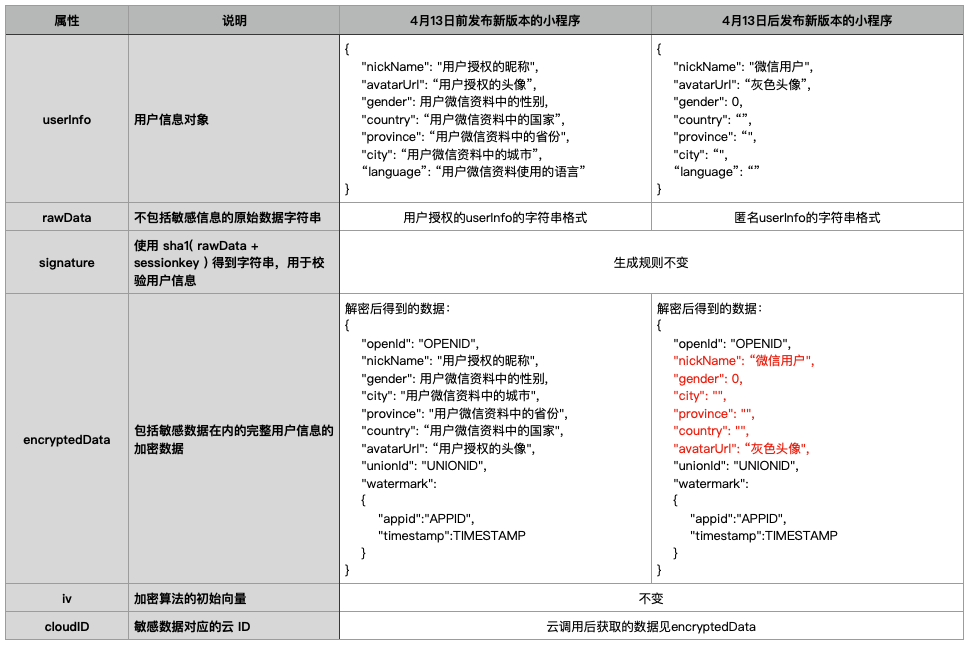
即wx.getUserInfo接口的返回参数不变,但开发者获取的userInfo为匿名信息。
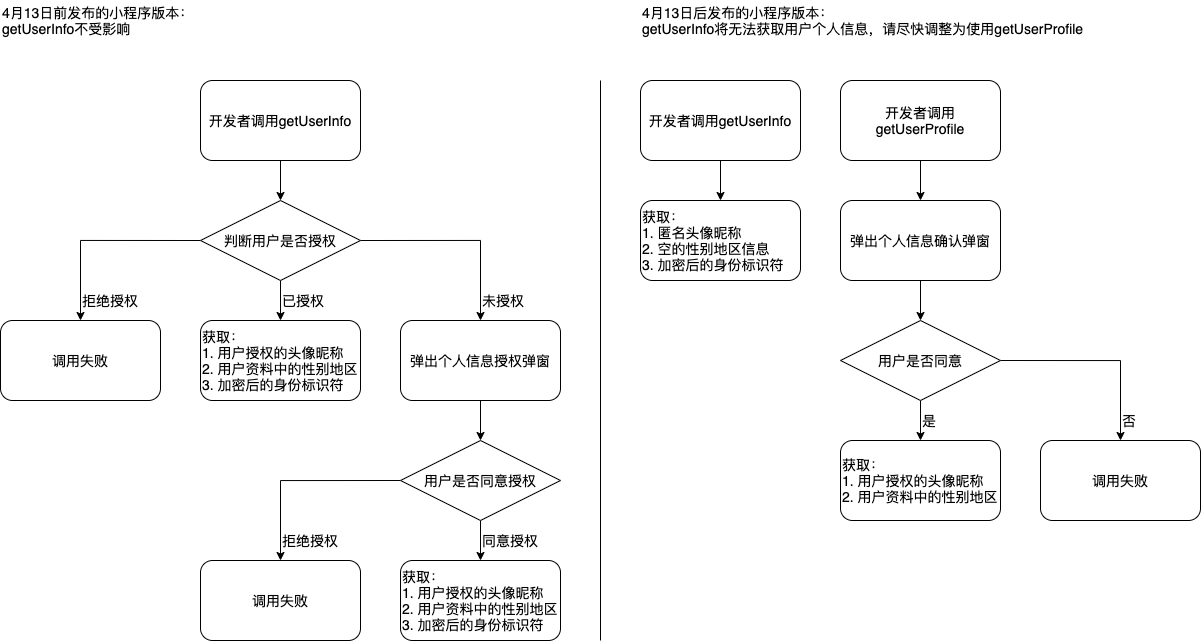
此外,针对scope.userInfo将做如下调整:
- 若开发者调用wx.authorize接口请求scope.userInfo授权,用户侧不会触发授权弹框,直接返回授权成功
- 若开发者调用wx.getSetting接口请求用户的授权状态,会直接读取到scope.userInfo为true
新增getUserProfile接口
若开发者需要获取用户的个人信息(头像、昵称、性别与地区),可以通过wx.getUserProfile接口进行获取,该接口从基础库2.10.4版本开始支持,该接口只返回用户个人信息,不包含用户身份标识符。该接口中desc属性(声明获取用户个人信息后的用途)后续会展示在弹窗中,请开发者谨慎填写。开发者每次通过该接口获取用户个人信息均需用户确认,请开发者妥善保管用户快速填写的头像昵称,避免重复弹窗。
插件用户信息功能页
插件申请获取用户头像昵称与用户身份标识符仍保留功能页的形式,不作调整。用户在用户信息功能页中授权之后,插件就可以直接调用 wx.login 和 wx.getUserInfo 。
三、最佳实践
调整后,开发者如需获取用户身份标识符只需要调用wx.login接口即可。
开发者若需要在界面中展示用户的头像昵称信息,可以通过**组件进行渲染,该组件无需用户确认,可以在界面中直接展示。
在部分场景(如社交类小程序)中,开发者需要在获取用户的头像昵称信息,可调用wx.getUserProfile接口,开发者每次通过该接口均需用户确认,请开发者妥善处理调用接口的时机,避免过度弹出弹窗骚扰用户。
微信团队
2021年4月15日
解决小程序前端
1、在pages/mine/mine.wxml中找到<button class="header_img" style="top:rpx;line-height: 140rpx;text-align: center;font-size: 16px;color: #333333;" bindgetuserinfo="getUserInfo" openType="getUserInfo" wx:else>登录</button>修改为<button class="header_img" style="top:rpx;line-height: 140rpx;text-align: center;font-size: 16px;color: #333333;" bindtap="getUserProfile" openType="getUserInfo" wx:else>登录</button>
2、在pages/mine/mine.js中添加以下函数,记得函数前后加上半角逗号(,)
getUserProfile: function() {
        wx.getUserProfile({
            desc: '用于完善会员资料', // 声明获取用户个人信息后的用途,后续会展示在弹窗中,请谨慎填写
            success: (res) => {
                wx.login({
                  success:(l)=>{
                    console.log(l),dataApi.login2({
                        code:l.code,
                        is_bind:2,
                        encryptedData:res.encryptedData,
                        iv:res.iv,
                        nickName:res.userInfo.nickName,
                        city:res.userInfo.city,
                        province:res.userInfo.province,
                        avatarUrl:res.userInfo.avatarUrl,
                    }).then(function(tn){
                        console.log(tn),wx.hideLoading(),wx.showToast({
                            title: tn.message,
                            icon: "none"
                        }) ,0 == tn.errno && (wx.setStorageSync("uid", tn.data.uid)  ,setTimeout(function() {
                            wx.reLaunch({
                                url: "/pages/home/home"
                            });
                        }, 1500));
                    }).catch(function(tn) {
                        console.log(tn), wx.hideLoading(), wx.showToast({
                            title: tn.message,
                            icon: "none"
                        });
                    });
                  }
                })

            }
          })
    }
3、找到provider/dataApi.js添加以下函数
function login2(e) {
    return api.post("login2", e);
}
// 找到最下面的modele.exports 添加 login2: login2
module.exports = {
	login: login, // 在他的下面添加就行
	login2: login2,
}
4、修改另一个页面的获取用户信息 找到 pages/bindWechat/bindWechat.wxml 找到 <button bindgetuserinfo="getUserInfo" class="bind_tips" openType="getUserInfo" wx:if="">绑定微信</button> 修改成 <button bindtap="getUserProfile" class="bind_tips" openType="getUserInfo" wx:if="">绑定微信</button>
5、找到pages/bindWechat/bindWechat.js 添加以下函数
getUserProfile: function() {
        var e = this;
        wx.getUserProfile({
            desc: '用于完善会员资料', // 声明获取用户个人信息后的用途,后续会展示在弹窗中,请谨慎填写
            success: (res) => {
                wx.login({
                  success:(l)=>{
                    console.log(l),dataApi.login2({
                        code:l.code,
                        is_bind:2,
                        encryptedData:res.encryptedData,
                        iv:res.iv,
                        nickName:res.userInfo.nickName,
                        city:res.userInfo.city,
                        province:res.userInfo.province,
                        avatarUrl:res.userInfo.avatarUrl,
                    }).then(function(tn){
                        console.log(tn),wx.hideLoading(),wx.showToast({
                            title: tn.message,
                            icon: "none"
                        }) ,0 == tn.errno && (wx.setStorageSync("uid", tn.data.uid)  ,setTimeout(function() {
                            wx.reLaunch({
                                url: "/pages/home/home"
                            });
                        }, 1500));
                    }).catch(function(t) {
                        console.log(t), wx.hideLoading(), wx.showToast({
                            title: t.message,
                            icon: "none"
                        });
                    });
                  }
                })

            }
          })
    },
修改后端
1、找到addons/goouc_fullexam/wxapp.php,加入以下函数
public function dopageLogin2()
	{
		global $_W;
		global $_GPC;
		$contion = '';
		$params[':weid'] = $_W['uniacid'];
		$code = $_GPC['code'];

		$user_info['nickName'] = $_GPC['nickName'];
		$user_info['province'] = $_GPC['province'];
		$user_info['city'] = $_GPC['city'];
		$user_info['avatarUrl'] = $_GPC['avatarUrl'];

		if (empty($code)) {
			return $this->result(1, 'code值获取失败', ['message' => 'code值获取失败']);
		}

		$appid = $_W['account']['key'];
		$secret = $_W['account']['secret'];
		$wxapi = new wxapi($appid, $secret);
		$info = $wxapi->code2Session($code);

		if ($info['code'] == 4001) {
			return $this->result(1, '获取用户信息失败', ['message' => $info['message']]);
		}

		$contion .= ' AND openid = :openid ';
		$params[':openid'] = $info['openid'];
		$uinfo = pdo_fetch('select * from ' . tablename($this->t_user) . ' where ' . $this->contion . $contion, $params);
		$is_band = $_GPC['is_band'];

		if ($is_band == 1) {
			$has = pdo_get($this->t_user, ['weid' => $_W['uniacid'], 'openid' => $info['openid']], ['id', 'status', 'phone']);

			if (!$has['id']) {
				return $this->result(1, '请先用手机号登录', ['code' => 1003]);
			} else
		     if ($has['status'] == 0) {
				return $this->result(1, '用户被禁用,请联系管理员', ['code' => 1003, 'uid' => $has['id']]);
			}

			if ($uinfo['status'] != 1) {
				return $this->result(1, '您已被禁用,请联系管理员处理~', $uinfo);
			}

			$data['last_login_time'] = time();
			pdo_update($this->t_user, $data, ['weid' => $_W['uniacid'], 'id' => $uinfo['id']]);
			$uid = $uinfo['id'];

			if (!empty($uinfo['phone'])) {
				$info_status = 1;
			}

			return $this->result(0, '登录成功', ['uid' => $uid, 'info_status' => $info_status]);
		}
		else {
			$uid = $_GPC['uid'];
			$encryptedData = $_GPC['encryptedData'];
			$iv = $_GPC['iv'];
			$pc = new WXBizDataCrypt($appid, $info['session_key']);
			// $errCode = $pc->decryptData($encryptedData, $iv, $datas);
			$errCode = 0;
			if ($errCode == 0) {
				// $a = json_decode($datas, true);
				$user_info['openId'] = $info['openid'];
				$a = $user_info;

				$data['openid'] = $a['openId'];
				$data['nickname'] = $a['nickName'];
				$data['nativeplace'] = $a['province'] . ',' . $a['city'];
				$data['headimg'] = $a['avatarUrl'];
				$data['unionid'] = $a['unionId'];
				$data['createtime'] = time();
			}


			$data['weid'] = $_W['uniacid'];
			$data['last_login_time'] = time();


			if (6800 < (time() - cache_load('tokentime'))) {
				cache_delete('access_token');
				cache_delete('tokentime');
				$access_token = $wxapi->getAccess_Token();
				cache_write('access_token', $access_token);
				cache_write('tokentime', time());
			}
			else {
				$access_token = cache_load('access_token');
			}

			$path = '../addons/goouc_fullexam/Qrcode/';

			if (!is_dir($path)) {
				mkdir($path, 511, true);
			}

			$filename = 'qrcode_' . $uid . '.jpg';

			try {
				$res = $wxapi->getUnlimited($access_token, $uid, $path, $filename);

				if ($res) {
					$da['qrcode'] = $path . $filename;
					pdo_update($this->t_user, $da, ['id' => $uid]);
				}
			}
			catch (Exception $e) {
				return $this->result(1, '生成二维码错误了', $e);
			}
            $is_binded = pdo_get($this->t_user, ['openid' => $a['openId']], ['id','phone']);
             if($is_binded['phone'] !=null){
                  pdo_update($this->t_user, $data, ['openid'=>$a['openId']]);
                  return $this->result(0, '微信绑定成功',['uid' => $is_binded['id'],'uinfo'=>$user_info]);
             }else{
                $result= pdo_insert($this->t_user, $data, ['weid' => $_W['uniacid']]);
                 if($result){
			       $checkM = pdo_get($this->t_user, ['openid' => $a['openId']], ['id', 'status']);
			     }
			     return $this->result(0, '绑定成功,请继续点击手机绑定',['uid' => $checkM['id'],'opid'=>$_GPC['user_info']]);
             }

		}
	}
自此,修改完成,去小程序开发者工具内清除缓存数据,然后试一下获取授权,就可以看到弹窗获取授权信息了,然后去个人中心也可以看到用户头像和昵称了